Meet GrowerIQ 3.3.0! 🚀
In this release, we've focused on inventory accuracy improvements and quality-of-life enhancements that make your daily workflows smoother. The highlight is a new Record Weight Gain activity for lots, plus better visibility into packaging runs and improved room management for mother plants.
Here's what's in this release:
✨ New Features
Record Weight Gain for Lots
Cannabis products can sometimes gain weight due to moisture absorption or other environmental factors. Previously, there was no way to accurately record these weight increases, which could lead to inventory discrepancies in your Health Canada Reports (HCR). Now you can properly document weight gains and keep your records accurate.
With the new Record Weight Gain activity, you can log the updated weight of a lot after it has gained mass. The weight increase will appear under the Classification's "Other Additions" to inventory in your HCR, ensuring full compliance and traceability.
📝 How It Works:
-
Navigate to the Lot Details page for the lot you need to update
-
Click the Record Weight Gain button in the Actions section (next to Enter THC/CBD)
-
Step 1 - Weight Details: Enter the new weight after gain, optionally connect a scale for automatic weighing, add an activity name and description, and select the date the weight was recorded
-
Step 2 - Admin Details: Capture the required signatures for Weighed By, Checked By, and Approved By
-
Step 3 - Confirm: Review the posting weight, posting date, calculated weight gain, and all admin signatures before submitting
-
Click Submit to record the weight gain
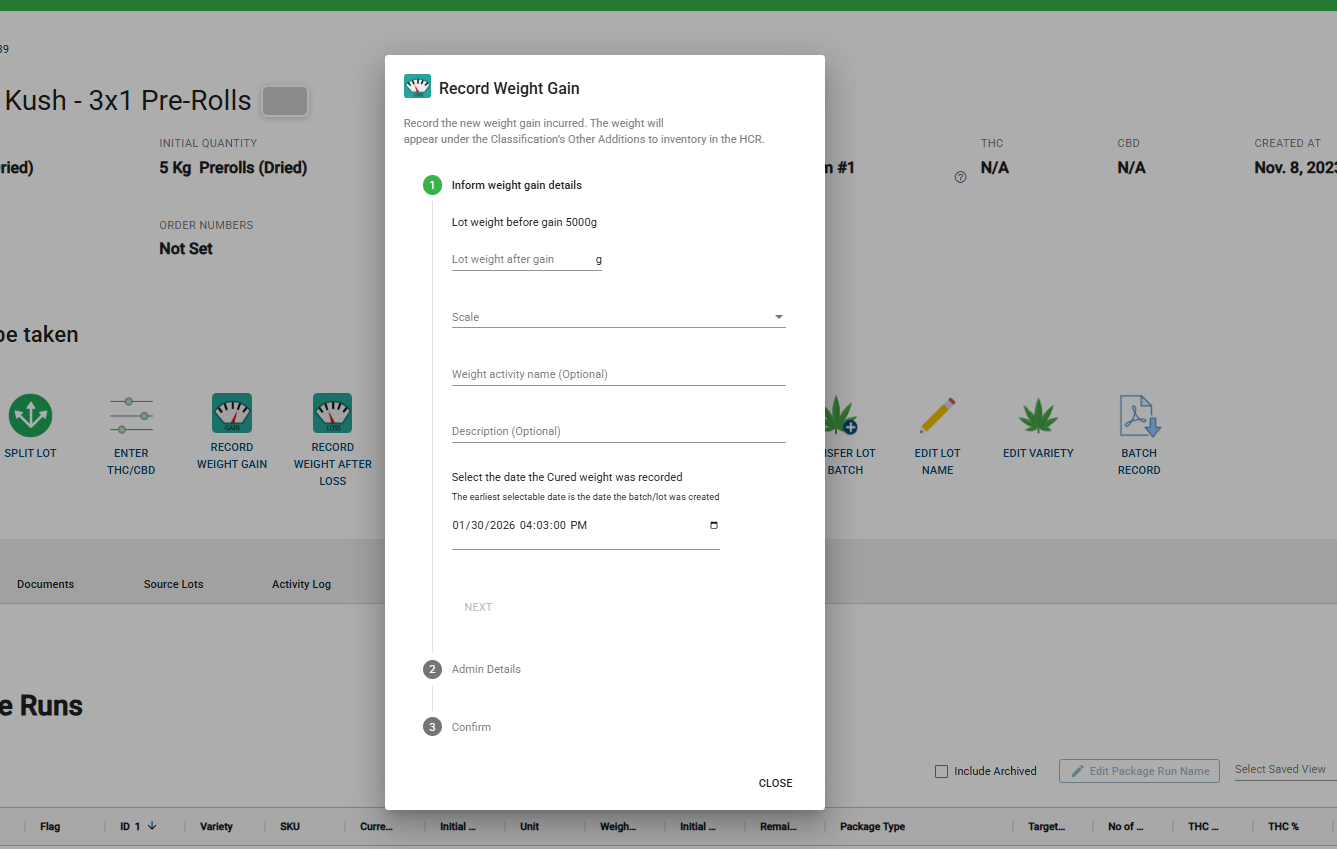
Note: The weight gain must be greater than the current lot weight. The earliest selectable date is the lot's creation date.
💡 Improvements
Expanded Invoice Details
You asked for more comprehensive invoicing, and we delivered! Invoice details now include additional product information such as unit counts, weights, and end types. This gives you and your customers a clearer picture of exactly what's being sold without needing to reference SKU definitions separately.
Packaging Run Visibility
Total mass packaged and remaining quantity are now displayed directly in the Packaging Runs grid and Inventory Explorer. No more switching between screens to track your packaging progress—see exactly how much product went into each run and what remains at a glance.
Room Management for Mother Plants
The Rooms function now works with Mother Plants and Mother Batches. You can automate fertigation activities for your mothers just like you do for regular cultivation batches, saving time and ensuring consistent care across all your growing inventory.
Spanish Translation Improvements
We've continued refining Spanish translations to provide greater clarity for Spanish-speaking users. Terms like "Batches" (previously translated the same as "Lots") now have distinct translations to avoid confusion.
Organization Environment Indicator
When using the Switch Org feature, you'll now see a clear identifier showing whether you're in a Production or UAT environment. This helps prevent accidental data entry in the wrong environment when managing multiple facilities.
Manitoba Medical Sales Tax
Taxation has been updated so that Manitoba provincial sales tax is now correctly applied only to Medical Sales, not recreational. This ensures accurate invoicing and compliance with regional tax requirements.
🔧 Bug Fixes
We've squashed several bugs to make your experience smoother:
-
Variety Selection Fixed: Previously, the Edit Variety modal would sometimes show only the first 25 varieties instead of all available options. Now you'll always see your complete variety list.
-
Seed Lot Merging: Resolved an issue where merging lots with different end types that included a Seeds lot would display a "Failed. Please try again" error. Merge operations now work correctly for all end type combinations.
-
Document Display: Fixed a rare issue in certain environments where batches incorrectly displayed all system documents instead of only their associated documents.
-
Currency Display: Corrected display issues with newly adopted currencies to ensure proper formatting and symbol display across all regions.
-
Room Batch Filtering: The Room Batch function now defaults to showing only active batches, with an "Include Archived" checkbox option. This prevents accidentally processing activities for inactive batches.
-
Processing Stage Workflow: Fixed an issue where the "Advance Stage" button was incorrectly enabled before "Record Processed Weight" was completed. The button now properly remains disabled until the required weight recording is done.
We Built This With You in Mind
💬 Have feedback? Submit an enhancement request by clicking here.
🚀 Ready to explore? Log into your UAT environment to test these features now!