Meet GrowerIQ 3.4.0.2! 🚀
This release is all about giving you better visibility and control over the data that matters for compliance. We've rounded out B300 reporting so finished 2.0 products are fully covered, added optional expiration dates to lots with auditable edit reasons, and brought source lot and packaging run IDs onto the CRM Analytics grid so Health Canada audit questions can be answered in seconds, not clicks.
Here's what's in this release:
✨ New Features
B300 THC/CBD on Received Inventory and Batches
You asked, and we delivered! Until now, THC and CBD potency could only be entered on Lots and Package Runs. With this release, you can record THC/CBD wherever inventory lives, and the values flow forward automatically through your workflow.
What this means for you:
-
Optional THC/CBD at receive time. A new "THC / CBD (Optional)" section on the Received Inventory dialog lets you capture potency the moment material arrives.
-
Edit potency anywhere. The same Edit THC/CBD dialog you know from Lots and Package Runs is now available on Received Inventory and Batches.
-
Values carry forward. Whatever you enter on Received Inventory flows into the Batch it feeds, and from the Batch into the Lot, unless you override it.
-
Batch math works the way it should. Splitting a batch carries the THC/CBD onto the new Batch ID. Merging batches produces a weighted average of the source inventories, which you can override manually if needed.
-
% and concentration, both directions. The Edit THC/CBD dialog shows both percentage and concentration (mg/g or mg/ml) fields for all end types, including oil-based products like crude and pure intermediate. Entering one auto-calculates the other, and you can override either independently when measured values differ from the calculated amount.
-
B300 Part B fills automatically. Quantities received with THC/CBD values are now reported as additions in Part B of the B300, removing the manual workaround of pushing material to a Lot just to record potency.
-
Track more than just THC/CBD. A new Cannabinoid Isolates section under Administration > Organization Settings lets you enable additional cannabinoids beyond THC and CBD for your organisation. Once enabled, those isolates appear as columns on inventory grids and as additional rows in the Edit THC/CBD dialog, so you can record full cannabinoid profiles where your COAs report them. THC and CBD remain always enabled by default.
📝 How It Works:
Recording THC/CBD at receive time:
-
Navigate to Warehouse > Received Inventory and start a new receive.
-
In the receive dialog, scroll to the THC / CBD (Optional) section.
-
Enter the THC % and/or CBD % values, or leave blank to record later.
-
Complete the receive as usual.
Editing THC/CBD on existing Received Inventory or Batches:
-
Open the Received Inventory or Batch detail page.
-
In the Actions to be taken section, click Enter THC/CBD (if no value exists) or Edit THC/CBD (if a value is already recorded).
-
In the dialog, enter the THC and CBD values in either percentage or concentration (the other field auto-calculates).
-
Click Save. The change is written to the inventory's activity log.
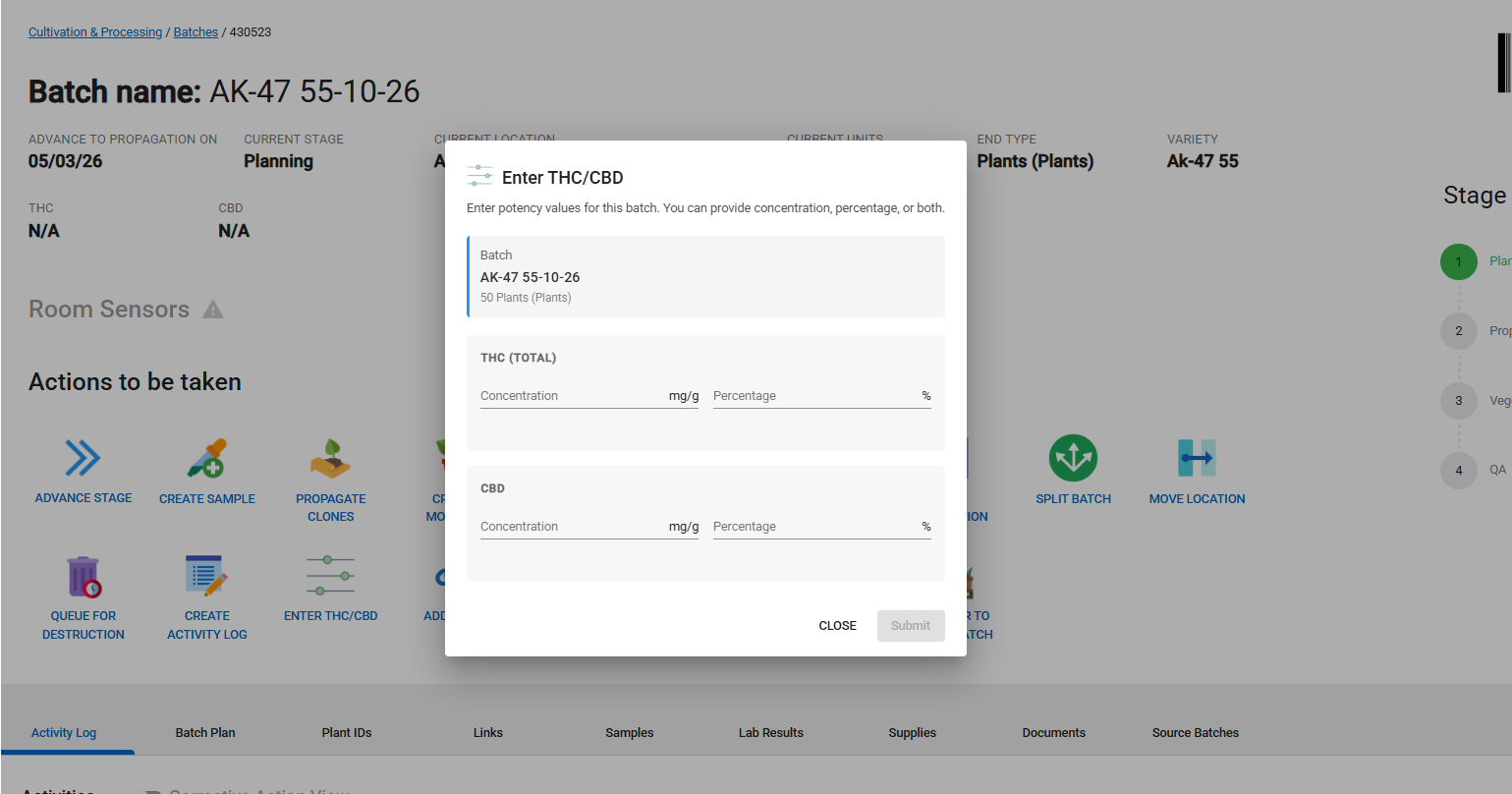
Note: THC/CBD entries are optional. Only record them if you need them for B300 reporting. The auto-calculation between % and mg/g (or mg/ml) is reactive, so you can enter the field that matches your lab COA and the other value updates automatically.
Bonus: Destruction reporting is now potency-aware
While building this feature, we also fixed a gap in destruction reporting:
-
The B300 report now correctly pulls THC mg/g from the source inventory when reporting destructions of extracts, edibles, and topicals (previously the calculation looked at the destruction record, which doesn't carry potency data).
-
THC % and CBD % columns have been added to the Destruction Queue and Destruction History grid pages.
-
THC % and CBD % are now displayed on the destruction detail info page and on the destruction report detail page, sourced from the original inventory.
Optional Expiration Dates on Inventory Lots
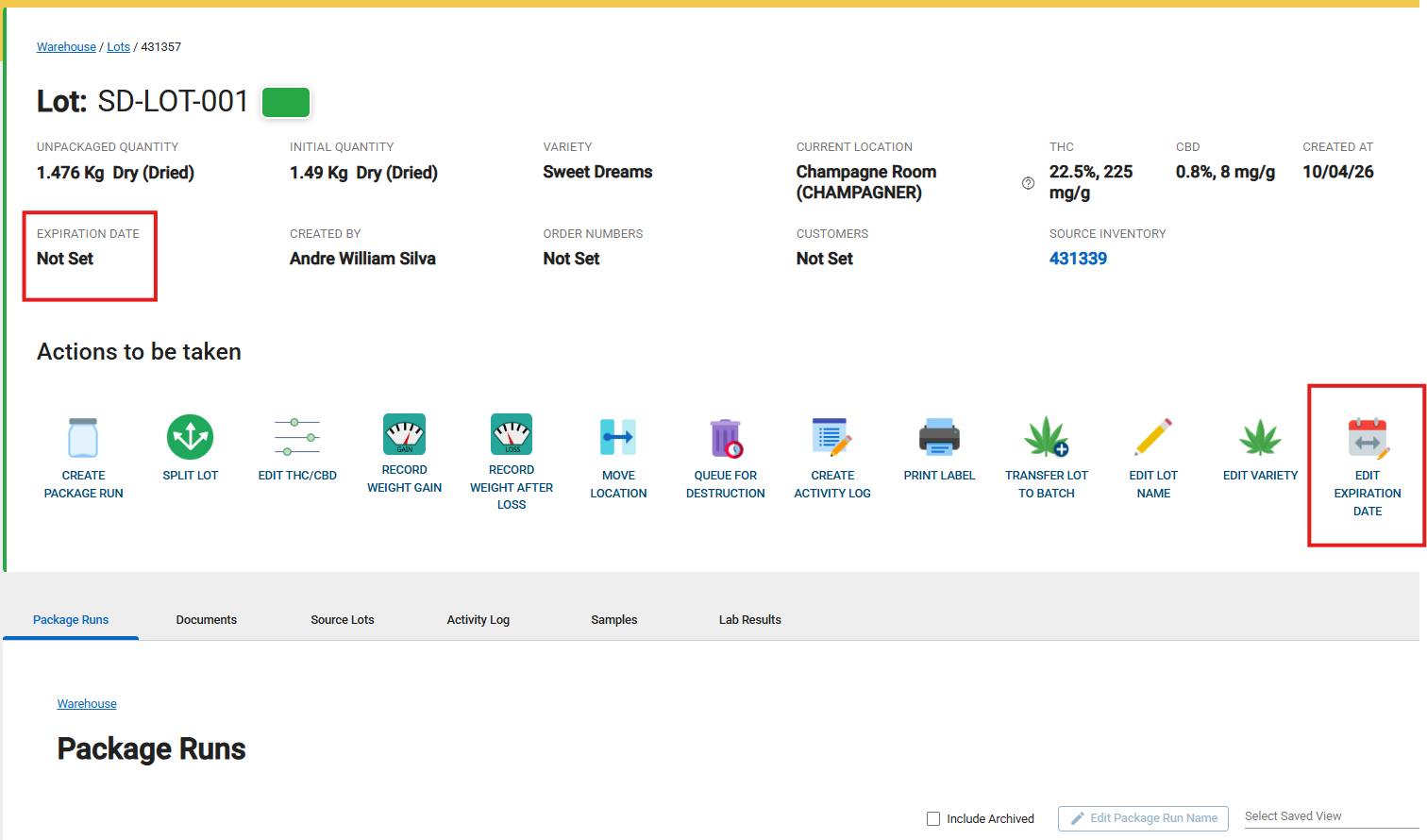
Inventory Lots can now carry an optional expiration date, with a built-in audit trail and an at-a-glance warning when expiry is close. This is especially useful for lots that need to be moved or used before they expire, so you don't get caught out by stock sitting too long.
You can set the expiration date when creating or editing a Lot, and once it's set you can update it from the Lot detail page. Every edit requires a mandatory Reason for Change, which is written to the lot's activity log alongside the new date, giving you a clean audit trail for compliance reviews. As an at-a-glance visual cue, expiration dates within 7 days of expiry (or already past) render in red on the Lot detail page.
Source Lot and Packaging Run on the CRM Analytics Grid
Sales analytics now answers traceability questions before they're asked. We've added Source Lot ID, Source Lot Name, and Packaging Run ID columns to the CRM Analytics Grid, so when a Health Canada auditor asks which lot a sold product came from, you can answer it in one click instead of digging through the audit trail.
The new columns are included in CRM Analytics exports, so you can hand over a single CSV that ties sales data to its source inventory without any post-export wrangling.
Meters (M) as a Unit of Measurement
Meters (M) is now available as a selectable unit of measurement when receiving supply lots. The new unit displays correctly across inventory views, activity logs, and exports, unblocking clients who need to receive raw materials measured by length.
💡 Improvements
This release focuses on the new features above, with the THC/CBD work bringing a number of quality-of-life improvements alongside it:
-
Edit THC/CBD dialog: independent percentage and concentration fields. Previously, editing either THC/CBD percentage or concentration would always overwrite the other field. You can now enter both values independently when they differ from the calculated amount, and clearing both fields resets the auto-calculation cleanly.
-
Edit THC/CBD dialog: oil-based end types now show both fields. Crude, pure intermediate, and other oil-based products used to only display the mg/ml field, which meant percentage values entered at receive time couldn't be viewed or edited later. Both fields now show for all end types.
🔧 Bug Fixes
- Recall: archived lots now selectable: Previously, when starting a recall, the "Lot numbers to Recall" dropdown excluded archived lots, even though those lots can still have items in the field that need to be quarantined. Now you can select any lot, including archived ones, so recall coverage matches reality.
We Built This With You in Mind
💬 Have feedback? Submit an enhancement request by clicking here.
🚀 Ready to explore? Log into your UAT environment to test it out now!