Correct the reason recorded against a destruction without rewriting its history.
📋 In This Article
- Why Amend a Destruction Reason
- Who Can Amend a Reason
- Which Destructions Can Be Amended
- How to Amend a Reason
- The Amend Destruction Reason Dialog
- What Changes and What Stays
- Troubleshooting
💡 Why Amend a Destruction Reason
The reason for destruction is chosen once, when material is queued for destruction. Sometimes it is wrong, or it was left blank. Common cases:
- The wrong reason was picked from the list when the material was queued.
- The destruction was recorded without a reason.
- A regulatory report needs the reason to classify the loss. For example, the INFARMED Annual Report reads the reason to decide which INFARMED loss operation a destruction belongs to. A wrong reason puts the destruction under the wrong operation, and a reason the report settings do not map is flagged in the review workbook and left out of the submission.
Mapping or amending?
If the reason on the record is correct but the INFARMED report does not recognize it, map the reason in the INFARMED report settings instead (see Portugal: INFARMED Report - Settings). Amend the reason only when it was recorded wrongly.
🔑 Who Can Amend a Reason
Amending a reason needs the Amend Destruction Reason permission. It sits under Destruction in the role's permissions.
- When this feature was installed, every role that already had Destruction access was given Amend Destruction Reason as well.
- An administrator can grant or remove it for a role in Administration > User Roles.
- Users without the permission do not see the Amend Reason button on the destruction material's page.
📜 Which Destructions Can Be Amended
| Destruction | Can the reason be amended? |
|---|---|
| Material waiting in the Destruction Queue | Yes |
| Material that has already been destroyed | Yes |
| A queue entry that was deleted | No |
| Changing a reason to or from Ungerminated seeds | No. Revert the destruction and queue it again |
Ungerminated seeds
The Ungerminated seeds reason changes how the destroyed quantity is recorded (it is counted in seeds). Because of that, a reason cannot be amended into or out of Ungerminated seeds. Revert the destruction and queue it again with the correct reason.
The new reason must be one of your organization's current destruction reasons, set up in Administration > Destruction Reasons.
📝 How to Amend a Reason
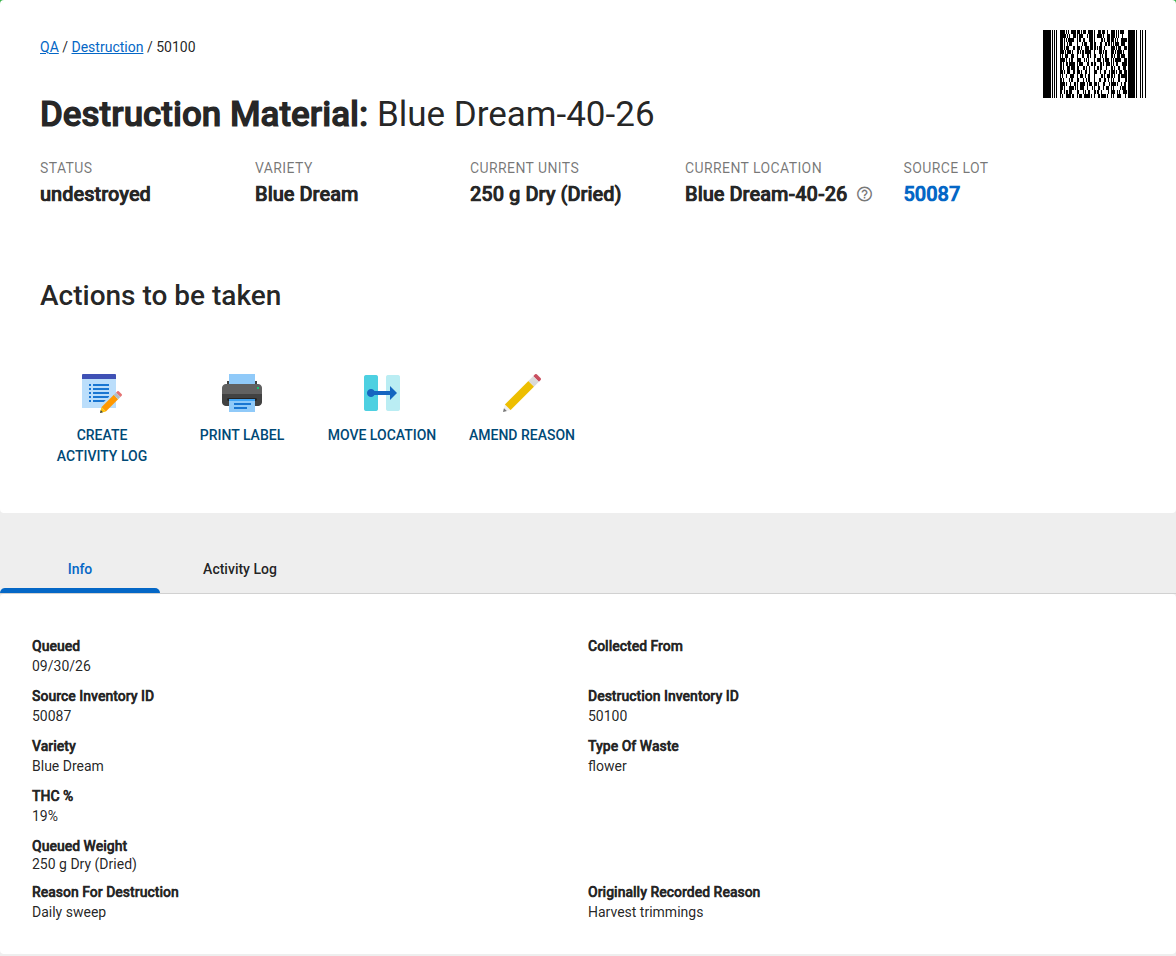
You amend a reason from the destruction material's own page. This works for material still in the queue and for material that has already been destroyed.
- Go to QA > Destruction.
- On the Queue tab (material waiting for destruction) or the History tab (material already destroyed), click the item's ID to open its page.
- Under Actions to be taken, click Amend Reason.
- Complete the dialog (see The Amend Destruction Reason Dialog) and click SAVE.
Not in the lists
Amend Reason is only on the destruction material's page. It is not a button on the Queue or History lists, and it does not appear in activity logs.
⚙️ The Amend Destruction Reason Dialog
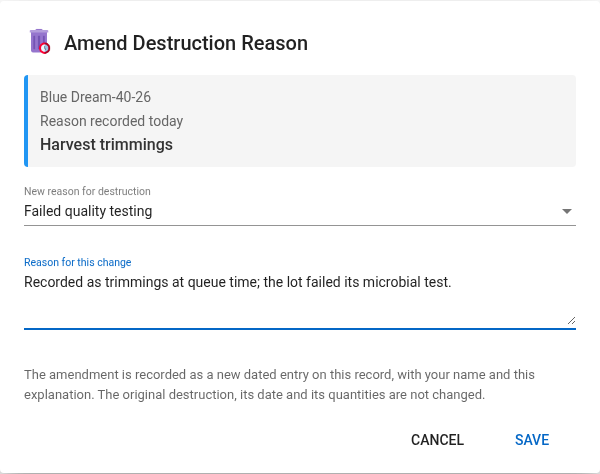
| Field | What it shows or needs |
|---|---|
| Item name | The name of the destruction material. |
| Reason recorded today | The reason on the record now, or No reason recorded if it was left blank. A reason that has since been removed from your list still shows here as it was recorded. |
| New reason for destruction | Required. Pick from your organization's current destruction reasons. |
| Reason for this change | Required. Explain why the recorded reason is being amended. Up to 500 characters. |
SAVE stays disabled until you pick a reason that is different from the one recorded today and enter an explanation. The dialog does not ask for witness signatures. Your name is recorded with the amendment.
When the amendment is saved, a check mark appears and the dialog closes on its own.
📜 What Changes and What Stays
| After an amendment | |
|---|---|
| Reason on the destruction material | Changed to the new reason, shown as Reason For Destruction on the material's Info tab |
| Reason it was queued with | Shown on the Info tab as Originally Recorded Reason, or No reason recorded if it was left blank. This field only appears once the reason has been amended |
| Original Queue For Destruction entry | Not changed. It keeps the reason it was recorded with |
| Destruction date, quantities and completion | Not changed |
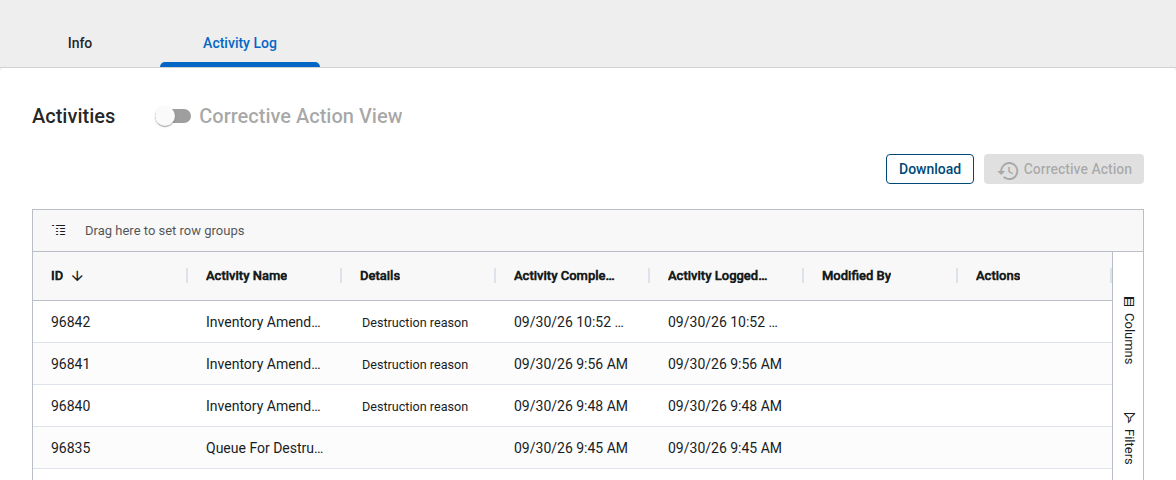
| Activity log | A new, dated entry is added to the destruction material's Activity Log tab |
The new entry is named Inventory Amend Destruction Reason, and its details read like this:
Destruction reason amended from Wrong reason to Correct reason. Reason: your explanation
If the destruction had no reason, it reads amended from none. Each amendment adds its own entry, so a record amended twice shows both changes with the reason before and after each one.
Next INFARMED report
The INFARMED report reads the amended reason the next time it is generated. Generate the report again after amending to clear the finding. See Portugal: INFARMED Annual Report - Overview.
🔧 Troubleshooting
I don't see the Amend Reason button. The button is on the destruction material's page, under Actions to be taken, not on the Queue or History lists. If it is not there, your role does not have the Amend Destruction Reason permission.
"You do not have permission to amend a destruction reason." Your role does not have the Amend Destruction Reason permission. Ask an administrator to add it in Administration > User Roles.
"That reason is no longer one of your destruction reasons." The reason you picked is not one of your organization's current destruction reasons. Choose another, or add it in Administration > Destruction Reasons first.
"This reason changes how the destruction's quantity was recorded, so it cannot be amended." You are changing a reason to or from Ungerminated seeds. Revert the destruction and queue it again.
"This destruction record is no longer available." GrowerIQ could not find the destruction record. Close the dialog and reload the page.
"The destruction record could not be loaded. Try again." Click Retry. If it keeps failing, reload the page.
"The amendment could not be saved. Your text is still here; try again." Click SAVE again. Your entries are kept.